AvatarAvatarAvatar

Native for SharePoint, Teams & OneDrive

Map Microsoft 365 as a Native Network Drive.

Eliminate sync conflicts. Capstan natively mounts SharePoint, Teams, and OneDrive as standard Windows network drives for seamless, reliable file access.

Built natively for the Microsoft Cloud ecosystem

ProLine
Hues
Greenish
Cloud
Volume
PinPoint

Core Capabilities

The cloud backend. The desktop experience.

Stop forcing employees to navigate clunky web portals or deal with broken file syncs. Give them the exact interface they are used to, supercharged with cloud capabilities.

One-Click Version Recovery

Accidental overwrites happen daily. Give your users the power to view document history and restore previous versions directly from File Explorer. Empower your team with self-service recovery and drastically reduce routine IT helpdesk tickets.

  • View full SharePoint version history natively
  • Restore previous file states instantly
  • Eliminate "I lost my file" support tickets
Seamless Metadata Management

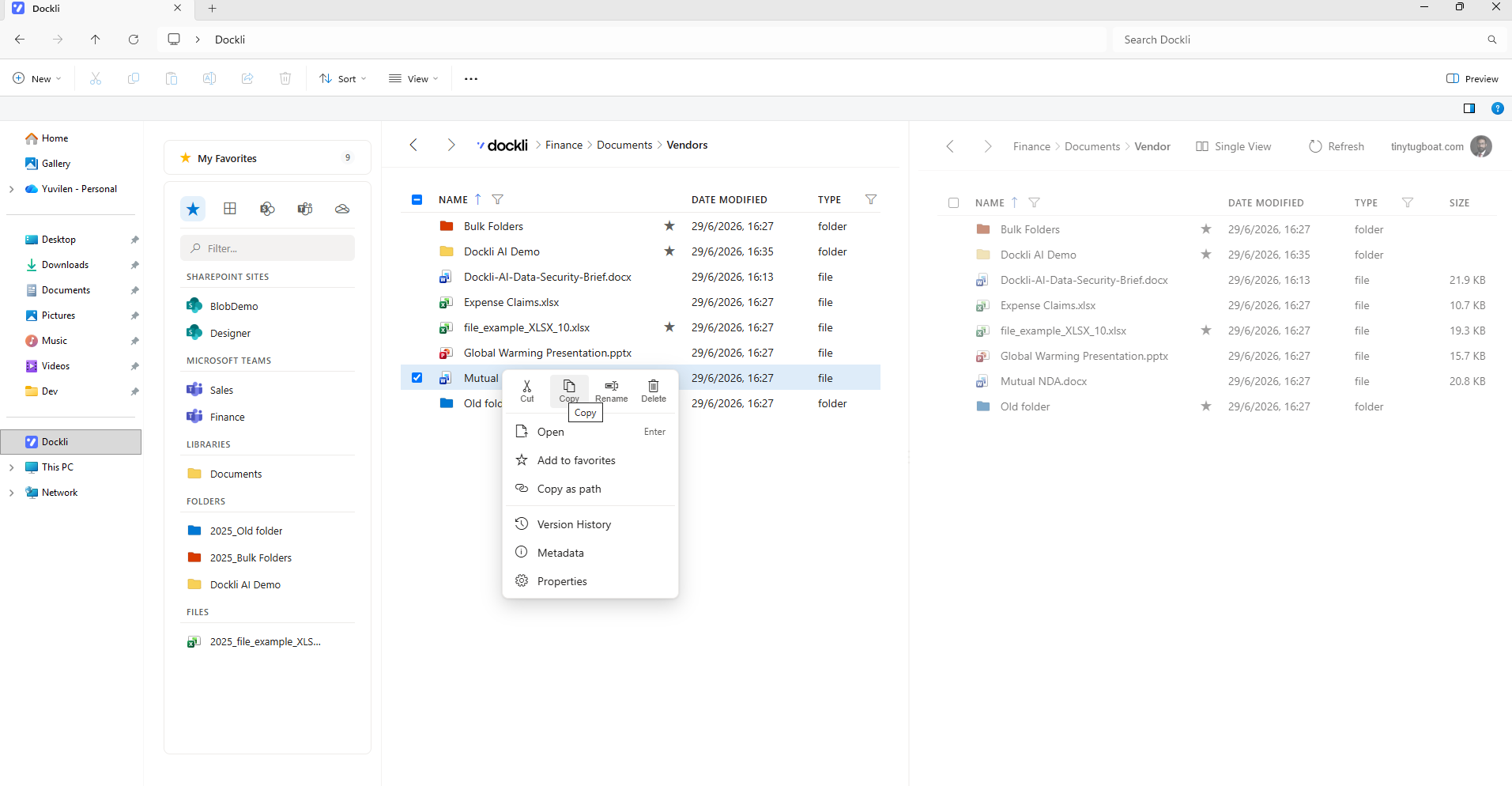
Stop forcing users into the browser just to tag a document. Capstan bridges the gap by bringing SharePoint's powerful metadata and custom columns directly into the Windows right-click menu. Keep your cloud architecture perfectly organized without disrupting traditional desktop workflows.

    Deep Search & Cloud Recovery

    Overcome the limitations of standard Windows Search. Right-click any mapped drive to query massive SharePoint document libraries instantly, or open the Cloud Recycle Bin to retrieve deleted files without ever touching the Microsoft 365 admin center.

    • Lightning-fast cloud search queries
    • Self-service Recycle Bin access
    • Bypass native Windows indexing limits

    Platform Features

    Built for IT Admins. Loved by End Users.

    Deploy enterprise-grade drive mapping in minutes. Seamless Microsoft 365 integration with zero operational overhead.

    Familiar File Explorer
    Familiar File Explorer

    Zero end-user training required. Employees interact with complex SharePoint libraries directly through standard Windows drive letters like Z: or S:.

    Advanced Context Menu
    Advanced Context Menu

    Right-click any file or folder to instantly access SharePoint metadata, manage check-ins, or generate secure sharing links without opening a browser.

    Native Windows Search
    Native Windows Search

    Stop losing files in the cloud. Capstan integrates directly with Windows Search, allowing users to find documents across massive SharePoint libraries instantly.

    Version History on Desktop
    Version History on Desktop

    Made a mistake? Users can right-click to view and restore previous document versions instantly, reducing routine IT helpdesk tickets.

    Silent Mass Deployment
    Silent Mass Deployment

    Deploy the Capstan desktop client silently via Microsoft Intune or your preferred RMM tool with zero end-user interaction required.

    Entra ID Secured
    Entra ID Secured

    Capstan acts as a secure bridge, strictly enforcing your existing Microsoft 365 permissions, Conditional Access rules, and MFA requirements.

    Ready to retire your legacy file server?

    Deploy Capstan in minutes and give your users the seamless drive mapping experience they expect.

    Enterprise Capabilities

    The power of the cloud, native to the desktop.

    Capstan doesn't just map drives; it extends native Microsoft 365 capabilities directly into the Windows environment.

    Real-Time Co-Authoring
    Real-Time Co-Authoring

    Open Office documents directly from your mapped drive and collaborate in real-time. Capstan seamlessly passes your authentication token straight to Word, Excel, and PowerPoint.

    Smart File Streaming
    Smart File Streaming

    Access massive SharePoint document libraries without filling up local hard drives. Files are mapped instantly but streamed entirely on-demand, saving local storage space.

    Centralised Telemetry
    Centralised Telemetry

    Maintain full visibility over your deployment. Track installation success, client connectivity states, and mapped drive health across your entire organisation from the Capstan web portal.

    Pricing

    Simple pricing for your team

    Start with a full-featured 14-day trial. No hidden fees, just simple per-seat pricing.

    €0
    The Free Trial

    Free for 14 days

    • Unlimited users/seats per tenant.
    • Full access to Capstan Desktop App.
    • Native File Explorer integration.
    • Command Center admin portal.
    • No credit card required to start.
    Most popular€4.50/mo
    Business Tier

    Billed monthly per user

    • Unlimited mapped drives per user.
    • Zero SSD footprint (files stream on demand).
    • SharePoint right-click superpowers.
    • Full diagnostic audit logs.
    • Standard email support.
    Custom
    Enterprise Tier

    Tailored to your organisation

    • Everything in the Business Tier.
    • Zero-touch remote drive deployment (MDM).
    • Centralized volume license management.
    • Custom telemetry & audit retention.
    • Priority support & dedicated account manager.

    FAQs

    Frequently asked questions

    Advice and answers from the our team.

    • How is Capstan different from OneDrive Sync?

      Unlike OneDrive, Capstan gives users a true, isolated Windows drive letter (like H: or S:) and streams files completely on demand. This means zero SSD bloat, no waiting for massive folders to sync, and no tangled local file conflicts.

    • Do you store our Microsoft 365 credentials?

      Never. Capstan uses native Microsoft 365 authentication via the Windows Account Manager (WAM). Your authentication tokens are encrypted locally on the user's machine using DPAPI, meaning we never see, touch, or store your passwords.

    • Will this work with our existing Azure/Entra security policies?

      Absolutely. Because we use Microsoft's native authentication broker, Capstan automatically honors all your existing Conditional Access policies, MFA requirements, and Intune device compliance rules without any extra configuration.

    • Do users lose SharePoint features when using File Explorer?

      Not at all. Capstan brings SharePoint superpowers directly to the Windows desktop. Users can right-click any mapped file to access full version history, generate sharing links, co-author documents, and edit custom metadata.

    • How difficult is it for IT to manage?

      It’s built for centralized IT control. Admins get access to the Command Center portal—a single pane of glass where you can monitor real-time telemetry, audit logs, instantly revoke device licenses, and even push remote drive mounts to users silently.

    • Can we test Capstan before purchasing?

      Yes. We offer a completely free, fully-featured 14-day trial. You can roll it out to your team, test the Command Center, and start mapping drives instantly with absolutely no credit card required upfront.

    Want to know first when there is cool updates?

    Join our newsletter for exclusive insights and updates on all our offerings.